Introduction
There are many ways that the various Record Types can be linked together as illustrated in the Formal Database Structure.
The techniques described in the sections below can discover links to particular records of interest from any other records such as:
- Relationship links to a selected Individual recordEvery person in your tree will have a single Individual Record, which holds all the information about that individual that you have entered. You can view and edit Individual records in the Property Box Dialogue. from Family recordsFamily records store information about families, and links to all the Individual Records for those individuals who make up a family. You can view and edit Family records in the Property Box Dialogue..
- Fact WitnessA Witness is somebody who played an important role in an event (or rarely, attribute) but were not a Principal, e.g. they could have been a bridesmaid at a wedding, rather than one of the individuals getting married. links to a selected Individual record from other Individual or Family record FactsFacts are one of the key concepts at the heart of Family Historian; they are how you record the things that happened to, or described, each ancestor (Individual)..
- Citation links to a Source record from Individual or Family records.
- Embedded links to a selected record from Rich TextRich text can be applied to most long text fields such as Notes and Text From Source, and offers a word-processing style of formatting. notes in another record.
However, they do NOT list links from a selected record to other records. Those must be discovered by inspecting various Property BoxThe Property Box is the primary window for data entry and for viewing details of stored records. It is used with records of all types. dialogues where record links are established such as:
- Links on the MediaWhen you add a picture, video, sound recording, document file etc into a Family Historian project, a Media record is created to represent that media item within the project; the Media record includes a link to the actual Media file. tab of a Property Box to Media records.
- Links on the Notes tab of a Property Box to shared Note or Research Note recordsFamily Historian version 6 and below supports two types of Notes: Local notes (associated with a single person, record, or fact); and Note Records (sometimes called Shared Notes), that can be linked to multiple records and/or facts. Version 7 introduced.
- Links in Fact CitationsA link between a source and a fact, documenting Where within the source you find information being "cited" to support the fact/conclusion. to Source recordsSource: "where information was found". This could be anything from an archive in a county records office, a book, or even a relative's recorded recollection. Citing your Sources helps to show how you reached a particular conclusion about an Individual..
- Links embedded in Rich Text notes to other records.
View Record Links
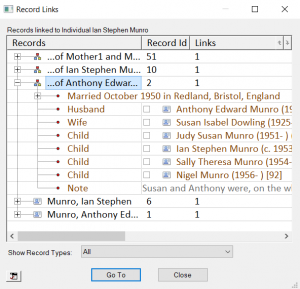
In all ƒh versions, select any one record and use View > Record Links… (in ƒh8 also on the right-click menu wherever a record is shown) to obtain a Record Links dialogue that lists all records linked to the selected record. Those include both regular links and Rich Text embedded links.
This dialogue allows all the record fields to be expanded similar to the Records WindowThe Records Window provides a comprehensive view of all the information stored within a Family Historian project. and the Property Box All Tab.
There are also options to Show Record Types selectively, Go To the Property Box of one record, and Add All to Named List… or Add Selected to Named List… via the  button.
View Source Citations
This is explained in the advice for Finding Records linked to a Source and includes a QueryQuerying is a very powerful feature that allows you to specify and save criteria for identifying a set of records of a given record type. technique.
View Place and Address Links
ƒh V6 added Place recordsAccording to GEDCOM, a Place should hold "The jurisdictional name of the place where the event took place…" and offers several ways to discover where they are used in addition to the other techniques described here.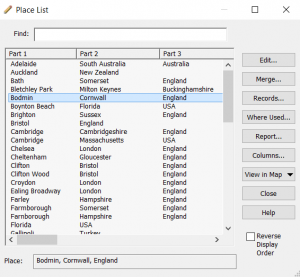
Tools > Work with Data > Places… opens the Place List dialogue, where you can select a single Place and click either the Records… or Where Used… buttons
The Records… button shows a dialogue similar to View Record Links above for links to a Place record.
The Where Used… button shows a Result Set similar to the PluginsPlugins are small programs that allow new features to be added without upgrading Family Historian itself; some plugins are written by Calico Pie and others are written by users. below.
Alternatively, multiple Place names may be selected and the View in Map > View in Map Window option displays them in the Map Window where all associated facts and records can be investigated.
In ƒh8 the same applies to the new Address"The address structure should be formed as it would appear on a mailing label…", according to GEDCOM; however, this is capable of a number of interpretations, and Address and Place are best considered together. records, which have their own Records Window tab and appear in the Map Window as address markers.
From the Records Window for Places, any records may be selected and the Map Window  option to Map Locations of Selected Place Records will display them in the Map Window where all associated facts and records can be investigated.
Version 5+ Plugins
Since ƒh V5, Plugins are available that have advantages over the options above, as they show more details, and double clicking in the Results Set will open the Property Box with the details in focus. Right-clicking some items will offer to Locate in Property Box, or Locate in All Tab which may show more specific details.
- Where Used Record Links works for multiple selections of any Record Type.
- List All Citations for a Selected Source works for one Source at a time.
- Link Lister (Version 7 and later) lists the links to and from a selected record in one place, including links that the Record Links dialogue does not show.