Introduction
People are connected by more than family. Someone may be another person’s friend, employer, teacher, godparent or neighbour, and ƒh8 can record any of these. There is no special record type for it: the relationship is recorded with a fact, and the people involved are attached to the fact with roles, as witnessesA Witness is somebody who played an important role in an event (or rarely, attribute) but were not a Principal, e.g. they could have been a bridesmaid at a wedding, rather than one of the individuals getting married.. If witnesses are new to you, read Witness Facts first.
Using an Existing Fact
Before creating anything new, ask which fact the relationship naturally belongs to. Often there is one already:
- Godparent: add the godparents to the Baptism fact with the role of godparent, which is already defined.
- Employer or business partner: add a role such as Employer to the OccupationAn occupation is defined in the GEDCOM standard as: ‘The kind of activity that an individual does for a job, profession, or principal activity’. fact, and attach the person to it.
- Teacher: add a Teacher role to the Education fact. For a pupil, turn it round: give the pupil the Education fact and add the teacher to it.
- Lived together: add everyone to a Residence fact with the role Resident, and reports will list them as living together.
- Neighbour: add a Neighbour role to Residence, or create your own fact (see below).
Witnesses are added in the Witnesses Window: select the fact on the FactsFacts are one of the key concepts at the heart of Family Historian; they are how you record the things that happened to, or described, each ancestor (Individual). tab of the Property BoxThe Property Box is the primary window for data entry and for viewing details of stored records. It is used with records of all types. and click the Witnesses button. New roles are added from the fact’s definition in the Fact Types dialog, and each needs a sentence templateSentences are used in conjunction with Fact Sets to produce Narrative Reports; their templates are highly customisable. so that narrative reports can describe the person. See Witnesses Window and Edit Role Dialog.
Friends
Version 8 has two facts made for friendship.
Friend List records one person’s friends. Add it to that person and you are asked for the friends straight away. A report on the person says they were “a friend of” each of them; a report on one of the friends mentions only the person whose list it is, not the rest of the list.
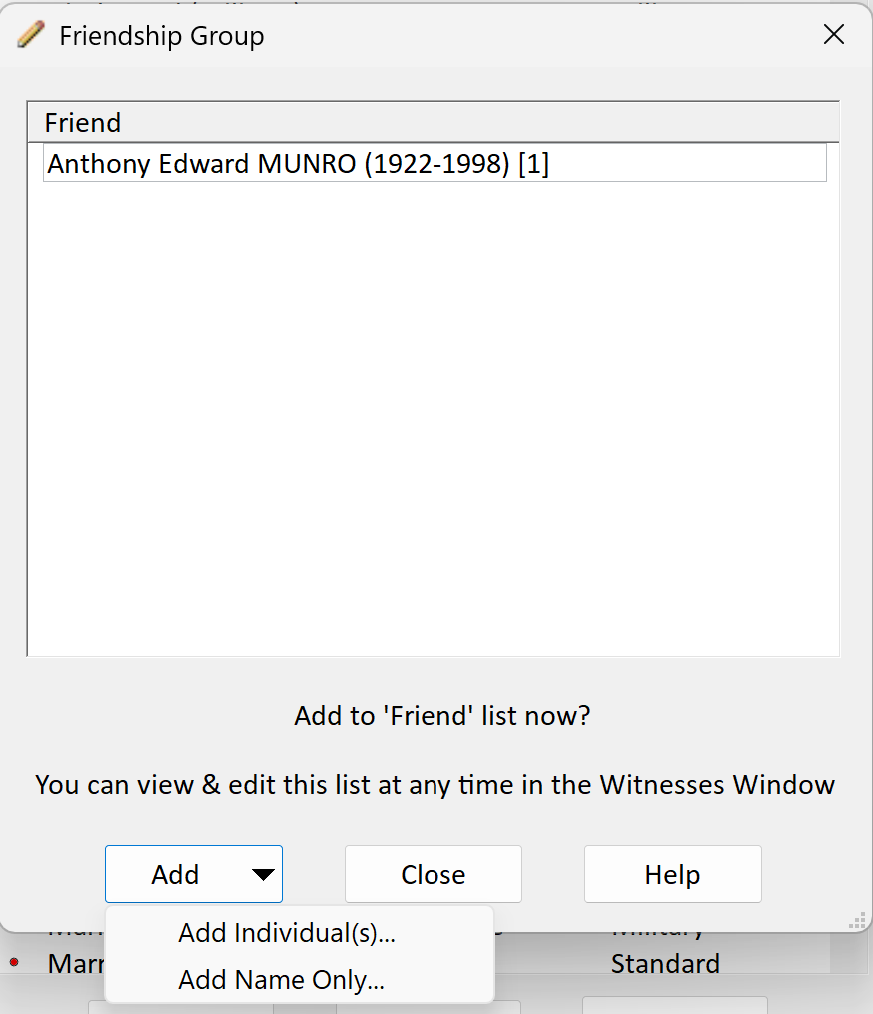
Friendship Group records a set of people who were all friends of one another. Add it to any one of them (it does not matter which); that person is put in the group automatically, and you are asked for the others. Reports on every member then say they were “friends with” all the rest.
For just two people, either will do.
Enslavement
The Enslavement fact records one or more people who were enslaved together, and optionally the person or people who enslaved them, with the roles Enslaved Person and Enslaver. Add it to one of the enslaved people; they are included automatically, and you are asked for the rest. A whole family can be recorded with a single fact.
Creating Your Own Relationship Facts
If nothing fits, create a custom factUsers of Family Historian can customize fact definitions, or create their own fact definitions to more closely match they way they want to work. in the Fact Types dialog and give it the roles you need. A relationship can be one-to-one (like a marriage), one-to-many (a teacher and pupils) or many-to-many (a group of neighbours), and the people in it can share a role or have different ones.
Two options on the role, in the Edit Role – Advanced Features dialog, make a custom fact behave like the built-in ones:
- Prompt to Add on Create asks for the people with that role as soon as the fact is added.
- Default Role for PrincipalThe Principal (for Individual Facts) is the person to whom the fact applies — the person who was born, had the occupation, emigrated etc. Family Facts have two Principals — the people who married, got divorced etc. gives the person the fact is added to that role automatically, as Friendship Group does.
For a group with no obvious principal, such as neighbours who were all neighbours of one another, model the fact on Friendship Group and attach it to any one of them. See Edit Role – Advanced Features and Add People with Roles Dialog.
Finding Relationships Later
The Witness queryQuerying is a very powerful feature that allows you to specify and save criteria for identifying a set of records of a given record type. type, new in Version 8, lists one row per person per role, which makes it easy to find every friend, enslaver or employer in a projectA Project is a Windows folder, created by Family Historian, which contains all your Family Tree information recorded in Family Historian. Normally located in the Documents\Family Historian Projects folder.. See An Overview of Queries in Version 8.