Introduction
This article attempts to highlight some of the pit-falls involved in recording Names of Individuals – particularly when trying to handle names that deviate from the Anglo-Saxon practice of Given Names followed by Surname, such as: Jo Doe, Mark C. Smith, or Louise Alice Elizabeth Mary Mountbatten-Windsor.
Issues arise in identifying name parts and in sorting and filtering names. There can also be confusion between Titles and associated Prefixes and Suffices, and between those Titles and job titles and OccupationsAn occupation is defined in the GEDCOM standard as: ‘The kind of activity that an individual does for a job, profession, or principal activity’..
In designing Family Historian decisions are made about how to store items of data. To a large extent this is determined by the international GEDCOMGEDCOM, an acronym for GEnealogical Data COMmunication, is a specification for exchanging genealogical data between different genealogy software. It is a file format that most genealogical programs and online trees recognise. standard (ƒh currently V7 aims to comply with GEDCOM 5.5.1). This can constrain what any genealogical program can store and process.
How you put information into ƒh is very much determined by how you want information to come out. You may also be influenced by what you think is right, what living subjects think is right, what your audience thinks is right, and what you understand as generally accepted practice.
Names and naming can be very sensitive, and in particular it is very easy to get foreign names wrong due to:
- translation (of language – e.g. French to English),
- transliteration (of character set e.g. Greek to English),
- different histories and cultures (e.g. Baltic, Slavonic and some other language groups where surnames take different endings depending on the individual’s sex and in formal situations are put before other names).
However, the result has to be understandable and unambiguous – but someone will still claim that a particular name should be formatted and presented in a specifically different way.
This is not helped by ambiguities in what is meant by apparently innocuous words like “surname” or even “name”.
(The author is Anglo-Saxon with some possible Gaelic/Scots/Pictish influences.)
Parts of Names
The most typical name structure in ƒh‘s original market (the United Kingdom) is Given Names followed by Surname. In normal usage these names are entered in the Name field (saved in %INDI.NAME%).
Data References
Because of some of the ambiguities in naming, this article often contains explicit references to data items. These items contained between % signs are what GEDCOM (and ƒh) understand as Data ReferencesData references are expressions which are used to provide a way of referring to particular items of data in your project, such as records or particular fields within records. They can be used for advanced customizations of diagrams, websites, family.
The [1] index in data reference such %INDI.NAME[1]% handles the case where an individual may have more than one name. For instance Lewis Carroll was the pen name for Charles Lutwidge Dodgson. In this case alternates name could be added in the Names & Titles dialog (behind the More (+) … ) in the main Property BoxThe Property Box is the primary window for data entry and for viewing details of stored records. It is used with records of all types. and they would take the field names %INDI.NAME[1]% and %INDI.NAME[2]%. Varying the index allows the user to specify a specific version or variant of a person’s name.
For more details see How to Handle People With Multiple Names.
Name Parts 1: Surname and Given Name
ƒh then has various ways to show parts of a name entered in the Name field.Surname – Basic
The surname is assumed to be the last word (identified by the space before it), unless the user puts slashes elsewhere to delineate the surname. For Example in ‘Ralph /Vaughan Williams/’ Vaughan Williams is an unhyphenated two word surname.
Setting the option in Tools > Preferences > Property Box tab >Show Surnames Between Slashes can ensure that ƒh always puts slashes around what it is interpreting as the surname so they clearly show in edit fields. Whilst ƒh does not display the slashes in diagrams and reports etc, it will capitalise the deemed surname when displaying it – unless the user switches that option off in Tools > Preferences > Property Box tab >Display surnames in upper case.
Given Name
The First Given Name is assumed to be the Preferred Name unless the Given Name Used field is completed in the Names and Titles dialog (behind the More (+) … in the main Property Box).

Examples 1 – Surname, Given, and First Names

Note in the above illustration:
- how the Surname ‘Vaughan Williams’ has been marked with slashes and how a stand-alone name has been marked as having no surname,
- how inputting a Given Name Used other than the first one has changed the Given Name of Sarah Jane Smith and Boris Johnson.
Name Formats 1 – Surname, Given, First
The Name field %INDI.NAME% as described above handles many of the common variations – although the above example also uses the separate non-standard Given Name Used field %INDI.NAME._USED%. The underscore in the data reference is to highlight that this is a non GEDCOM reference that can probably only be interpreted by ƒh or anther program’s input routines that have been specifically coded to expect that data reference.
%INDI.NAME% Field. The examples above use some of the most common – found in help under Name Formats.
%INDI.NAME:SURNAME%– extracts that part of the%INDI.NAME%field between the slashes – or the last word in the Name field if there are no slashes%INDI.NAME:GIVEN_ALL%– extracts all of the%INDI.NAME%field except text between the slashes%INDI.NAME:GIVEN%– is the first of the Given Names unless the Given Name Used field (%INDI.NAME._USED%) is completed in which case it is displayed by%INDI.NAME:GIVEN%%INDI.NAME:FIRST%– is the always the first of the Given Names
Name qualifiers are ƒh specific and will not be found in the GEDCOM standard.
Name Parts 2: Prefixes and Suffixes
Where an individual has name parts that are put before or put after the name they are entered as Name Prefixes (e.g. Dr., Sir., Lt., Monsieur le Professeur, Frau Doktor Doktor, etc.) or Name Suffixes (e.g. PhD., QC, CEng, MP, ONZ, COG, SP, etc.) in the Names & Titles dialog (behind the More (+) … ) in the main Property Box.

Prefixes and suffixes can be a minefield and we need to remember that we put in to ƒh what we want to get out. Typically they contain adornments that get added to a name as they may appear on a formally addressed envelope. For example:
| No | Name Prefix | Name | Name Suffix | Notable for |
| 1 | Mr | John Peter Rhys Williams | MBE FRCS | Rugby Player (“JPR”) & Surgeon (hence Mr not Dr) |
| 2 | Dr | Daniel Joseph Harris | South Australian Cricketer and Medical Doctor (degrees could be in the suffix) |
|
| 3 | The Right Honourable | Jacinda Kate Laurell Ardern | MP | New Zealand Prime Minister |
| 4 | Sir | Jonathan Stafford Nguyen-Van-Tam | MBE FRCPath FRSB FMedSci | Deputy Chief Medical Officer for England |
| 5 | Colour Sergeant | Johnson Gideon Beharry | VC, COG | (His surname is the anglicised depiction of Bihari) |
| 6 | Baroness | Helena Kennedy | QC | Queen’s Counsel (senior lawyer) and member of the UK House of Lords where her title is Baroness Kennedy of The Shaws |
| 7 | Richard Hinds | LLB | Football player with a Law Degree | |
| 8 | Prof. Dr. Dr. agr. |
Helga Sauerwein |
A professor in Germany who has 2 doctorates (degrees could be in the suffix) | |
%INDI.NAME.NPFX% |
%INDI.NAME% |
%INDI.NAME.NSFX% |
Data References for the normal home for these data items |
Name Formats 2 – Prefixes and Suffixes
Name Qualifiers relevant to Prefixes and Suffixes are:
%INDI.NAME:PREFIXED% – is the %INDI.NAME.NPFX% + %INDI.NAME% field
%INDI.NAME:SUFFIXED% – is the %INDI.NAME% + %INDI.NAME.NSFX% field
%INDI.NAME:ADORNED% – is the %INDI.NAME.NPFX% + %INDI.NAME% + %INDI.NAME.NSFX% field
Generation Signifiers – Western
Western Generation signifiers (as Henry Ford II or Donald Trump Jr.) cause a slight problem because some argue that they are part of the name (it distinguishes Donald Jr. from his father Donald) and not a suffix. The main two alternatives (part of the given names or a suffix) are illustrated below – note the impact on NAME:GIVEN_ALL if it is part of the name entered after the surname – an ExpressionExpressions are composed from two technical features: Data References and Functions; they also often involve Operators to compare values. %INDI.NAME:GIVEN_ALL% . ” ” . %INDI.NAME:SURNAME% will produce ‘Donald John Jr. Trump’. Entering it as a suffix will avoid the ‘Jr.’ being shown in a non-standard placeAccording to GEDCOM, a Place should hold "The jurisdictional name of the place where the event took place…" . (Entering it as part of the surname – between the slashes – risks a Query filter on for instance ‘Trump’ failing to find the, to FH different, surname ‘Trump Jr’.)

Generation Signifiers – Eastern
In some East Asian Societies the Given Name may include generation signifiers in the first characters. These can be drawn in sequence from Generation Poems which are specific to each lineage. Subject to information not being lost in transliteration, Given Name sorts may expose these generation signifiers and the V7 function =LeftText(%INDI.NAME:FIRST% , 2)in a query can extract the first 2 (Latin character set) characters from the First Given Name.
Name Parts 3: Nicknames
Nicknames tend to be unofficial names by which people are known and in ƒh and GEDCOM are added under their names in the %INDI.NAME.NICK% field accessed via the Names and Titles dialog (behind the More (+) … in the main property box.
They may be diminutives (e.g. Molly, Gus, Steph, Bertje, Anke) or refer to some (not always flattering) physical aspect of their appearance (Shorty, Blondie, Pegleg). They are different from generation signifiers (Henry Ford II, Donald Trump Jr. which are usually better handled as Name Suffixes – see earlier) and tend to be able to stand alone.
Note:
-
- The nickname field is a child field of the Name field so the nickname by which someone was known has to be specific to their actual Name. This could be an issue where someone for some reason changed their name.
- Only one nickname field can be added per name so multiple nicknames applicable to a single name are separated by commas.
Name Parts 4: Surname Prefixes
Some surnames – particularly ones which are not English – have surname prefixes (also called particles or affixes). In some countries these are very prevalent. One contributor to the forum estimated that possibly 40% of surnames in Dutch either had prefixes or some form of complex surname. [ref]
Surname prefixes are often prepositional and translate as ‘of’, ‘of the’ or ‘from’, In some countries they are indicators of nobility in the person’s ancestry (for example ‘von’ in German), in others they are not necessarily so (for example ‘van’ in Dutch). In other cases they may be relational – ‘daughter of’ or ‘son of’ (for example Nic, Ní or O/Ó/Ua/Uí in Irish and other Gaelic languages; Bint, Bath, bat or Ben, bin, ibn in Arabic and Hebrew).
Examples of Surname Prefixes
- Vincent Van Gogh (Dutch Painter)
- Simon “Piet” van der Valk (fictional Dutch detective)
- Martinus & Reit Van der Valk (founders of a Dutch hotel chain)
- Herbert von Karajan (Austrian Musician)
- Ursula von der Leyen (German Politician – President of the European Commission)
- Karl Ludwig Freiherr von und zu Guttenberg (also known as Karl Ludwig von Guttenberg – member of the German anti-Nazi resistance)
- Richard Di Natale (Australian Green Politician)
- Marsha de Corova (British Labour Politician)
- Charles de Batz-Castelmore d’Artagnan (this man on whom the fictional character was based assumed his mother’s maiden name of d’Artagnan, in addition to his father’s surname of de Batz-Castelmore. His “Surname only” name appears to then have been d’Artagnan)
- Jacqueline du Pré (English Cellist)
- Alfred d’Orsay (French Artist)
- Ronan O’Gara, (Rónán Ó Gadhra, Irish rugby union rugby player)
- Ian McCaskill (Scottish Weather Presenter – also John Robertson McCaskill)
- Klara MacAskill (Hungarian-Canadian sprint canoer)
The name elements in bold above are generally understood to be part of the Surname rather than the Given Names (if we have to be binary). In the name field therefore they are included with the main surname within the slashes (‘Ursula /von der Leyen/’). Within GEDCOM and ƒh they are referred to as Surname Prefixes. Confusingly the ‘Surname’ (between the slashes) consists of the surname prefix and the, er… surname.
This can cause a number of problems:
- When the ƒh option to capitalise the Surname is enabled, such names are all in capitals (VON DER LEYEN) rather than the prefix remaining in the case entered (von der LEYEN, Van GOGH).
- Rules on capitalising the prefix can depend on country and even on grammatical context. For example, in Dutch grammar it is usually ‘Professor De Vries’, but ‘Peter de Vries’ or ‘P. de Vries’. This is difficult to emulate in software.
- In sorting and filtering, the whole element between the slashes is Indexed.
- With O’Connor and O’Gara, it is generally understood that they should index under ‘O’, so that is satisfactory – except in sorting, the apostrophe is usually ignored; so Philip Orr and Jamie Osborne sort between Brian O’Riordan and Collie O’Shea (see for example: list of Irish Rugby Players)
- Similarly with McCabe and MacAskill – but some argue that where the prefix has not been totally subsumed into the surname (e.g. Macmillan), all the Mac… and Mc… names should index together – almost like an additional initial letter – and then sort on the part of the name after the Mc or Mac. ƒh cannot automatically do this.
- Where the prefix is detached (by a space), the preference (depending on country – see discussion of Dutch Tussenvoegels – and sometimes even on particular family practice) is often that the prefix should be ignored when sorting and filtering. So, Ludwig van Beethoven, is Indexed under ‘B’, but many expect Jacqueline du Pré to index under ‘d’ rather than ‘P’. There may be an implied rule that short Surnames do not stand apart from their prefix.
- Semantically there is often confusion arising from the surname being the Surname Prefix plus the Surname!
GEDCOM Name Pieces
ƒh (and GEDCOM 5.5.1.) partly handle this issue by having three extra fields which can also be used to include the information held in the NAME field:- Given Names: %INDI.NAME.GIVN%
- Surname Prefix: %INDI.NAME.SPFX%
- Surname: %INDI.NAME.SURN%
By using these fields you can be explicit about how the name divides and you can sort on the pure (unprefixed) Surname. These 3 fields are sometimes referred to as name pieces.
These fields can be accessed via the All tab on the Individual Property Box by right clicking on the name.
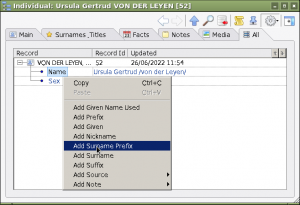
Alternatively you can create a custom tab (as seen in the row of tabs in the illustration above) to allow name pieces to be entered directly:
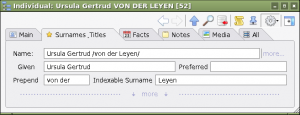
In creating the above custom tab I have chosen to label
- the
%INDI.NAME.SPFX%field as ‘Prepend’ – because it avoids confusion with the Name Prefix%INDI.NAME.NPFX%– which sits in front of the Name whilst the Surname affix sits inside the surname (as delimited by slashes) at the beginning of the surname. (It also fits the window layout) - the
%INDI.NAME.SURN%as the ‘Indexable Surname’ – to avoid confusion with Surname (the item you enter between slashes in the Name field%INDI.NAME:SURNAME%)
To create custom tabs see the online help page for Customize Property Box. (You can chose your own labels for the fields)
Points to Note when using Name Pieces
- ƒh is programmed to use the NAME field for many standard diagrams and reports, for name selection dialogs and for the first column in the Records WindowThe Records Window provides a comprehensive view of all the information stored within a Family Historian project. for Individuals – which is fixed and non configurable. To avoid blank cells in the Records Window and to avoid having to recode all standard reports and diagrams, if the [Given, Surname Prefix and Surname] group of fields are being used, they should be used as well as the Name field not instead of the Name field.
- ƒh‘s main code will not automatically keep the Name field aligned with the [Given, Surname Prefix and Surname] group of fields. However there are plug-ins that can be run to copy data between the Name field and the [Given, Surname Prefix and Surname] group of fields. However the rules for doing this may not be sufficiently complex to deal with all issues. (For instance: see the discussion of the Surname d’Orsay below.)
- If you do specify any elements to use the [Given, Surname Prefix and Surname] group of fields in preference to the Name field, be aware that if those fields are not completed for all individuals you may get incomplete results for queriesQuerying is a very powerful feature that allows you to specify and save criteria for identifying a set of records of a given record type. etc.
- It is probably best to split the Surname Prefix and Surname elements to suit how you want items to sort (given a suitable expression – see later) rather than according to a strict parsing of the name. So if you want Van Gogh to index under ‘V’, enter ‘Van Gogh’ in the Surname Field and leave the Surname Prefix empty, but if you want Van Gogh to index under ‘G’, enter ‘Van’ in the Surname Prefix and ‘Gogh’ in the Surname Field.
- If you want a name like ‘Alfred d’Orsay’ – where the prefix is not separated from the surname by a space – to index under ‘O’ and you put ‘d” in the Surname Prefix and ‘Orsay’ in the Surname, you need to be aware that if you have specified an element to be
%INDI.NAME.SPFX% . " " .%INDI.NAME.SURN%, (Surname Prefix, space, Surname) to produce ‘von der Leyen’ you will get ‘d’⇔Orsay’ with a space between the prefix and the main surname. Using the Name field to record a name as you want it to display and then specifying the relevant element to be%INDI.NAME:SURNAME%will avoid this problem. If the option to have slightly different entries in the Name and the Name Pieces, beware of plug-ins that bulk update these fields. - The Name qualifiers (such as
%INDI.NAME:SURNAME%) work on the Name field only.- If you use the name qualifier
%INDI.NAME:SURNAME%ƒh will return anything between the slashes in the Name field or if there are no slashes, it will return the last word in the Name Field. It will not return the%INDI.NAME.SURN%field. - Likewise if you use the name qualifier
%INDI.NAME:GIVEN_ALL%ƒh will return anything outside the slashes in the Name field or if there are no slashes, it will return all except the last word in the Name Field. It will not return the%INDI.NAME.GIVN%field.
- If you use the name qualifier
Titles and Occupations
Name Prefixes and Suffixes, Titles and Occupations (together with associated job titles) can cause confusion and any resolution of that confusion may not apply in different cultures.
In Britain (and probably in many other countries) Titles tend to have two origins: nobility and holding a senior position in one of the professions. The latter are probably instances that most users will want to record.
Sources of Confusion
The confusion most applies because in many occupations, specific job titles may carry particular Name Prefixes and Suffixes and some appointments may mean that people acquire Titles.
For example (1), within the British Army in World War One, an Army Officer (occupation) might hold the job title of Adjutant (an appointment), but his rank (and associated prefix) might not keep up with his appointments. Some appointments (for instance Staff Captain) may not have been filled by people holding the rank of Captain (prefix Capt.).
For example (2), within the ‘Clergyman’ occupation, a particular job title might be ‘Bishop of Durham’. The Bishop of Durham by right of appointment has a seat in the House of Lords with a Title. The House of Lords website reports (as at 28 June 2022) for the current bishop:
The Lord Bishop of Durham’s full title is The Rt Rev. the Lord Bishop of Durham. His name is Paul Roger Butler …
This is a problem within GEDCOM because %INDI.NAME% (the parent of Name Prefixes and Suffixes, %INDI.TITL% and %INDI.OCCU% are all sibling fields and aligning specific Prefixes with specific Titles with specific Occupations is not an in-built feature of GEDCOM.
Unlike Occupation and Title, Names (and associated prefixes and suffixes) cannot hold datesWhen an Event happened, or an Attrribute was true. of validity; you can be recorded as holding an Occupation between two dates, you can be recorded as having a Title between two dates, but you cannot be recorded as having a Name (and associated prefixes and suffixes) between two dates.
Options
Dates for Titles and Occupations are most easily added through the FactFacts are one of the key concepts at the heart of Family Historian; they are how you record the things that happened to, or described, each ancestor (Individual). Tab of the Property Box. It is also possible to create a Name Change EventEvents are things that happened to an Individual and Attributes are things that described them. – which can have dates, but that does not help ƒh pick the right name when creating sentences in a book or other form of output. In practise in ƒh it is probably easiest to enter either the latest prefixes and suffixes or to use those used when the person concerned was at the most notable point in their lives and to make that name the Primary Name.
Thus if, for example, you manage to trace your line via gateway ancestors back to Royalty (many in England will eventually track back to Kings who had multple offspring usually through multiple mistresses – as found by the likes of Danny Dyer and Matthew Pinsent on the TV program Who Do You Think You Are – similar considerations probably apply to some other Royal lines), you might want to enter King Edward I as an Ancestor.
- His birth name was ‘Edward /Plantagent/’, with the Prefix ‘Prince’, Nicknames ‘The Lord Edward’ (not an official title) and ‘Longshanks’, but he is best known by
- His regnal name of ‘Edward I /of England/’, with the Prefix ‘King’, Nicknames ‘Longshanks’ and ‘The Hammer of The Scots’, and Title ‘King of England’. The ‘of England’ in the Name might be split between a Surname Prefix ‘of’ and a Surname ‘England’.
- His regnal name would be set as his Primary Name. Even though he did not become known historically as Edward I until Edward II came along, pragmatically the regnal number is included as a regnal Given Name.
- In ƒh Version 7 the descriptor Type fields
%INDI.NAME.TYPE%for the two names could be set to ‘Birth’ and ‘Regnal’
With ƒh Version 7 allowing for descriptor Type fields for both Titles and Names alignment by means of matching the Type may be possible – albeit with a complex expression.
Job titles such as ‘Bishop of Durham’ (as opposed to Titles ‘The Rt Rev. the Lord Bishop of Durham’) might be included either as specific Occupations in %INDI.OCCU% or in the Occupation note %INDI.OCCU.NOTE2% for a more general (in this case ‘Clergyman’) Occupation – which would mean that the Note could hold a summary of that person’s career in that Occupation.
Using an Occupation Note to hold the summary of a career would mean that if someone had two simultaneous careers, say as a ‘Politician’ and as a ‘Reserve Army Officer’, the details would not get inter-weaved by date of appointment, but would be grouped by occupation which may present better.
Holding job titles as specific occupations (together with dates of appointment in the %INDI.OCCU.DATE% field might however enable more lucid output sentences.
Alignment of Prefixes and Suffixes with Titles might be managed by holding the Full Title with Prefix and Suffix in the Title field %INDI.TITL% but that might create uncomfortably over-loaded ƒh generated sentences such as “he was The Rt Rev. the Lord Bishop of Durham from 2011 to 2013 and from 2013 The Most Rev. and the Rt Hon. the Lord Archbishop of Canterbury”, when more normally you would either use a job title (which would therefore need to be in the %INDI.OCCU% field rather than the associated note) or you would use the title as used by the quote for the current Bishop of Durham above ‘The Lord Bishop of Durham’ without the prefix. A possible way of storing this information is shown below.

How the user personally resolves any confusion will in the end come back to how ƒh processes these items, so what is entered is very much determined by what the user wants to get out in Diagrams and Reports etc.
For those wishing ƒh to output content that is not obviously incorrect there is much to be said for keeping it simple and minimising use of Name Prefixes and Suffixes. In Version 7 the Preferred Fact Flag can help highlight the most prominent Titles etc.
For those who hand-wrangle the output either by directly writing in a word-processor or by using a word-processor to amend ƒh output, many of the contradictions can be recorded in Fact NotesFamily Historian version 6 and below supports two types of Notes: Local notes (associated with a single person, record, or fact); and Note Records (sometimes called Shared Notes), that can be linked to multiple records and/or facts. Version 7 introduced so an author can consider how to handle them at the moment of writing.
Sorting and Filtering in Family Historian
In the Record Window and in Queries the user can sort and filter on any column or combination of columns which can contain either data references to a field or an expression combining fields.
ƒh unless told otherwise will always (usefully) try to sort the%INDI.NAME% as a Given Name sort within a Surname sort – another reason for ensuring that the NAME field is completed.
Sorting
Common Data References or Sort Expressions are:
%INDI.NAME% which will sort on the name as entered, but on Given Name within Surname – no matter where the Surname is positioned, so /Máo/ Zédōng will sort between Pat /Macmillan/ and Alex /Mona/, but not with Zinedine /Zidane/ and /Zhang/ Ziyi.
-
- This is in contrast with running the Surname and Given Names fields together in an expression
=Text(%INDI.NAME.SURN% . %INDI.NAME.GIVN%)which treats the resultant string as just that, a string of Characters – which in the example below would give the un-useful – but programatically correct – alphabetic sort A-O-O-W in the 9th character of:-
- WILLIAMSAlbert
- WILLIAMSONAlbert
- WILLIAMSONWilliam
- WILLIAMSWilliam
-
- Specifying a space between the two parts of the above expression
=Text(%INDI.NAME.SURN% . " " . %INDI.NAME.GIVN%)solves the problem because the space character sorts before all alphabetic and numeric characters (in the Western (Latin) character set):-
- WILLIAMS Albert
- WILLIAMS William
- WILLIAMSON Albert
- WILLIAMSON William
-
%INDI.NAME:SURNAME_FIRST%will sort like%INDI.NAME%(Given Name within Surname) – because the underlying data is%INDI.NAME%
- This is in contrast with running the Surname and Given Names fields together in an expression
With all the above ‘Ludvig /van Beethoven/’ and ‘Herbert /von Karajan/’ will sort with ‘Amerigo /Vespucci/’ not with ‘Johannes /Brahms/’ or ‘Mark /Knopfler/’.
-
- The expression
%INDI.NAME.SURN% . ", " . %INDI.NAME.GIVN% . " " . %INDI.NAME.SPFX%will put the above two musicians correctly in with their respective colleagues because they will sort as if the names were ‘Beethoven, Ludvig van’ and ‘Karajan, Herbert von’. Again note the use of a space to ensure Given Names sort within Surnames. - ‘Jacqueline /du Pré/’ however will sort with the ‘P’s rather than under the ‘d’s.
- Note that for this sort to work the three piece fields
SURN,GIVNandSPFXmust be populated or a complicated expression must be written to test for each field and if it can’t find it to try to extract the nearest equivalent from the NAME field.
- The expression
Where there are similar names that need to be sorted together – as in McCaskill and MacAskill or where surname endings vary – see later discussion of Tchaikovsky (male) and Tchaikovskaya (female) – sorting on Soundex (%INDI.NAME:SOUNDEX%) may be thought to give useful if not quite perfect results. In practise there are too many undesired results. Soundex codes on the First Letter and then the next three consonants sorted into groups – padding with zeros if necessary. For instance McCaskill and MacAskill will have the same code (M224) as will Muquasgill but not McDonald (M235)!
For a completely custom sort it is probably easiest to have a custom attributeUsers of Family Historian can customize fact definitions, or create their own fact definitions to more closely match they way they want to work., say %INDI._SORT% into which the user can enter the name as they want it sorted. Again this field must be fully populated to work or an expression written to find alternatives if the field is empty. Using an alternative NAME say %INDI.NAME[2]% to hold a custom sort name is open to accidentally publishing it if the diagram or report specifies all names to be listed. The name-index of a “sort name” could also be accidentally changed.
Filtering
If merely filtering, in name selection fields (such as found at the top of the records window), ƒh will extract any name where a word in the field starts with the desired filter text – so Filtering on ‘beet’ will find VAN BEETHOVEN as shown below.
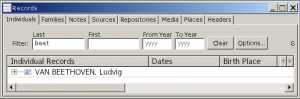
Filtering on ‘hoven’ will not work – the filter letters must match the beginning of a word.
In the above and similar name filters ƒh is searching the NAME field in effect using %INDI.NAME:SURNAME% for the ‘Last’ name and %INDI.GIVEN_ALL% for the ‘First’ name as if they were two separate filterable fields.
This is another reason for ensuring that the NAME field is appropriately populated even if the SURN, GIVN and SPFX fields are being preferred.
Name Structures in Family Historian
Introduction
The recording of people’s names can get fraught particularly when there is a danger of trampling on cultural sensitivities. To a degree this is almost inevitable when trying to shoe-horn different names and name structures into a program that uses a Western Alphabet.
For instance 潤之 or (simplified) 润之 may not immediately mean anything to many of us – we many not even be sure what language it is. According to Wikipedia (which in its English form either deliberately or unwittingly tends to reflect a western liberal view of the world) these characters are the name of the former Chairman of the Communist Party of China, Máo Zédōng, possibly still known more commonly in the English speaking world as Mao Tse-tung. Wikipedia explains.
English romanisation of name
During Mao’s lifetime, the English-language mediaWhen you add a picture, video, sound recording, document file etc into a Family Historian project, a Media record is created to represent that media item within the project; the Media record includes a link to the actual Media file. universally rendered his name as Mao Tse-tung, using the Wade-Giles system of transliteration for Standard Chinese though with the circumflex accent in the syllable Tsê dropped. Due to its recognizability, the spelling was used widely, even by the Foreign Ministry of the PRC after Hanyu Pinyin became the PRC’s official romanisation system for Mandarin Chinese in 1958; the well-known booklet of Mao’s political statements, The Little Red Book, was officially entitled Quotations from Chairman Mao Tse-tung in English translations. While the pinyin-derived spelling Mao Zedong is increasingly common, the Wade-Giles-derived spelling Mao Tse-tung continues to be used in modern publications to some extent.[Pottinger, Jesse (August 26, 2019). “Explainer: Mao Zedong or Mao Tse-tung? We Have the Answer“. That’s Online. Retrieved April 24, 2020]
Surname Last
ƒh is programmed by default to best handle the western name structure of Given Names followed by a Surname – ‘Mike /Smith/’.Surname First
ƒh will handle surname-first name structures by using the slashes to delineate the family or surname – ‘/Máo/ Zédōng’. Care needs to be taken if elements are assembled from the [Given, Surname Prefix and Surname] group as that group within itself is order-agnostic; it is easier to rely on the Name field to ensure that such names come out as ‘Máo Zédōng’ and not accidentally as ‘Zédōng Máo’ due to specifying an element as%INDI.NAME.GIVN% . " " . %INDI.NAME.SURN%.
Care needs to be taken when entering Far Eastern names (such as from China or Korea or Singapore) as sometimes people will have Westernised their name (or had it Westernised) not just by romanising the character set but also by switching the order to the Western order. Such is the case with the family of Kyung Wha Chung, the noted Korean musician – Chung is the family name. This is in contrast to other Korean violinists ‘/Lim/ Ji-young’ and ‘/Lee/ Ga-yeon’ who use the Korean word order. Wikipedia notes Kyung Wha Chung’s names as:
| Hangul | |
|---|---|
| Hanja | |
| Revised Romanization | Jeong Gyeonghwa |
| McCune–Reischauer | Chŏng Kyŏnghwa |
Often looking at sibling’s names will highlight the name order (in the Chung example: Myung-Soh Chung, Myung-wha Chung, and Myung-whun Chung).
No Surname
Where a name does not have a name that could be understood as a surname, the user has to decide on a convention and follow it. This may involve including 2 slashes together in the NAME field (e.g. ‘Spartacus//‘ or ‘Boudica//’) which means the name is treated as a Given Name and not as a Surname. Alternatively enclosing everything within slashes will indicate to ƒh that everything is to be treated as a Surname.
Patronymics and Matronymics
Similar decisions have to be made where a name contains a given name and a Patronymic or Matronymic but no surname. Patronymics and Matronymics are names derived respectively from the given name of the individual’s father or mother. For example the Welsh name Llywelyn ap Gruffydd ap Morgan contains no surname – translated it means Llywelyn son of Gruffydd son of Morgan – literally three Given Names joined by relational particles. Pragmatically the user may decide that Llywelyn is the individual’s given name and should be treated as such and the rest is not given but inherited and should therefore be treated as the surname. That will at least mean all the brothers sort and filter together and all sisters sort together. In Welsh the ‘son of’ prefix is ‘ab’ or ‘ap’ and the ‘daughter of’ prefix is ‘Fetch‘ or ‘Vetch’ or ‘Verch’ or ‘Erch’ so there will be separation of brothers and sisters in this type of sorrt. (Note: in late use of patronymics in Wales, it’s not uncommon to see a daughter recorded as e.g. Jane ap Harry.)
This will lead to an inconsistency that the user may choose to live with if, within the same projectA Project is a Windows folder, created by Family Historian, which contains all your Family Tree information recorded in Family Historian. Normally located in the Documents\Family Historian Projects folder., they have names which have given names, a patronymic or matronymic and a surname. The Russian composer Pyotr Ilyich Tchaikovsky, was the son of Ilya Petrovich Tchaikovsky. Here the Pyotr (Peter) is the given name, the Ilyich is the patronymic derived from his father’s given name, Ilya, and the family surname is Tchaikovsky. His younger brother was Modest Ilyich Tchaikovsky. His sister was Aleksandra IIinichna Tchaikovskaya – note the feminine form of both the patronymic and the surname. Their paternal grandfather was Pyotr Fedorovich Tchaikovsky – and we can guess at his father’s name! In these circumstances the user may chose to include Tchaikovsky or Tchaikovskaya as the Surname – because it is unambiguously the inherited family name, and leave everything else to be treated as Given Names.
Name Formats 4 – Patronymics and Matronymics
If names with a Patronymic or Matronymic and only a single Given Name, with or without a Surname are entered into the Name field (‘Given Patronymic|Matronymic /Surname/’ or ‘ /Surname/ Given Patronymic|Matronymic’) the qualifier:
%INDI.NAME:MIDDLE%will in effect extract the Patronymic or Matronymic. The
:MIDDLE qualifier extracts everything except the Surname (slashed or un-slashed) and the First Given Name.

For Name Structures with no Surname (double slash at the end) this will also work provided there is a single (first) Given Name and the rest can be interpreted as Patronymic/Matronymic. In the following examples the :Middle qualifier will extract the Patronymic/Matronymic shown:
| No | as stored | %INDI.NAME:MIDDLE% – Patronymic |
| 1 | Llywelyn ap Gruffydd ap Morgan// | ap Gruffydd ap Morgan |
| 2 | Llywelyn ap Gruffydd// | ap Gruffydd |
Surnames for New Children
When ƒh adds a new child to a couple the default (slashed) surname for the child is controlled by an option on Tools, Preferences, General, Insert father’s surname when creating children
- Checkbox on – Patrilineal (father’s surname – unmodified)
- Checkbox off – None – user types or pastes in the surname
This default is set within Family Historian at Project Level and applies when new children are added to a couple where the father’s surname is known.The default can be over-written if required. ƒh does not handle the situation where surnames change form depending on the sex of the bearer (most often found in Baltic and Slavic Languages). For instance in the Tchaikovsky example above the daughter is shown as Aleksandra IIinichna Tchaikovskaya. Users will have to decide whether to sacrifice strict accuracy (i.e. use just one spelling for both sexes) for the ability to sort by Given Name within Surname. With sex dependent surname endings, they are likely to sort by Given Name within Sex within Surname.
Note that if the setting is set to Patrilineal and the father is unknown, but ‘Unknown father’ is entered in the name field of the father, the default surname for any children will be ‘father’, unless the name had been entered as ‘Unknown father//’.
However if the default is set to Patrilineal and for a time it is desired to enter a whole lot of family groups which do not follow the patrilineal naming convention, the default setting can be changed temporarily whilst those families are entered. This is more convenient than deleting the father’s surname (or, possibly worse, forgetting to do so and introducing erroneous data).
In Genealogical Software the Primary Name by which someone is know is their name at birth, so if the above option is set on children will get their father’s birth surname by default. If on marriage he took on a double-barrelled name (combining his surname with his spouse’s), he can have an alternate name entered as his married name and that can be set as his primary name – which means his children when entered will pickup the double-barrelled name. Alternatively his name could be temporarily altered – but you then have to remember to alter it back.
At the moment ƒh cannot use Matrilineal Surnames (names based on the mother’s surname) as the default, nor can it use patronymics or matronymics as the basis for a name – in these cases the whole name must be entered manually.