If you cite your evidence outside Family Historian, for example to record your citation in a research log, then you may be looking for a simple way to paste it into FH but still have it appear as a footnote in reports. If so, then you may be interested in trying these Freeform Citation Source Templates but note that they are for Family Historian V7.
Before installing, please ensure that you have taken a backup of your FH Project and your settings (via the Backup and Restore Family History Settings plugin).
Note that the download includes two templates:
- Freeform citation template A to be used for citations in plain text
- Freeform citation template B to be used citations with a mixed (ie. italic) text section. Elizabeth Shown Mills (Evidence Explained: Citing History Sources from Artifacts to Cyberspace: 3rd edition revised p.52) specifies that website, book, CD, DVD, journal and map titles are cited in italic font.
To install, first download the templates from the link at the foot of this page. You will save a file called User Written.fhst. To complete installation, doubleclick the downloaded file.
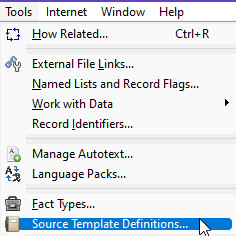
To add the Freeform citation templates to your project, first select Tools > Source Template Definitions
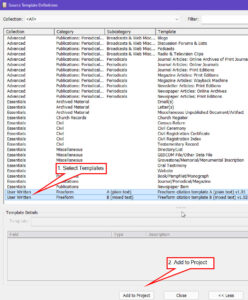
Ensure that the Collection filter at top left is set to <All> then locate and select the two new Freeform Templates in the User Written Collection and click Add to Project.
Two ways to use a Freeform citation template are either to add it to an existing source from the Records Window or to Create Source from Template.
First, let’s look at the more complex example, Freeform citation template B, as it’s the most useful because it supports mixed text.
Select Freeform citation template B and Family Historian displays a message that “A new Source record has been created. If this is not what you intended, click ‘Undo’ on the Edit menu.”
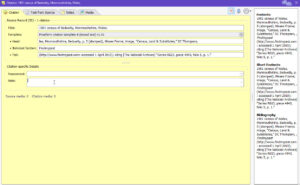
Note that ‘Freeform citation template B’ has three fields: ‘Head’, ‘Italicized Section’ and ‘Tail’. The fields ‘Head’ and ‘Tail’ are for plain text while the middle field, ‘Italicized Section’ is to contain the embedded italic text.

The following example, for an online database entry, is from page 305 of Evidence Explained.
1901 census of Wales, Monmouthshire, Bedwelty, p. 5 (stamped), Moses Frame; image, “Census, Land & Substitutes,” DC Thompson, Findmypast ( http://www.findmypast.com: accessed 1 April 2015); citing [The National Archives] “Series RG13, piece 4943, folio 5, p. 1.”
- Give the Source record an appropriate Title eg. 1901 census of Bedwelty, Monmouthshire, Wales. This should ideally be consistent with your other Source Records in the Records Window.
- Paste the first part of your citation into the ‘Head’ field. For example, 1901 census of Wales, Monmouthshire, Bedwelty, p. 5 (stamped), Moses Frame; image, “Census, Land & Substitutes,” DC Thompson
- Paste the website title into the ‘Italicized Section’ field eg. Findmypast
- Paste the rest into the ‘Tail’ field. eg. (http://www.findmypast.com: accessed 1 April 2015); citing [The National Archives] “Series RG13, piece 4943, folio 5, p. 1.”
This should now appear as a Footnote in the Source record and as a Source in reports created in FH. The website title should be in italics.
The same text will appear in the Bibliography but this section can be suppressed with the appropriate Report Option in FH.
You might wish to check how it looks in a report.

If your citation only needs plain text then use ‘Freeform citation template A’ which has a single data field called ‘Head’
The following example, for an original certificate, is from page 475 of the same edition of Evidence Explained.
England, birth certificate (certified copy) for John Thomas Patterson, born 9 July 1860; registered September quarter 1860, Tynemouth District 10b/145, Longbenton Sub-district, Northumberland; General Registry Office, Southport.
Simply paste the citation into the single field called ‘Head’.
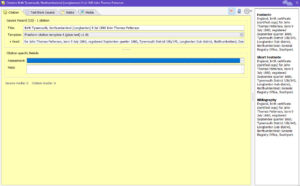
With a result like this:

Other than Evidence Explained, some resources that may help you to write your own citations are:
- Mastering Genealogical Documentation by Thomas Jones
- Peeling Back the Layers by Diana Elder (3-part blog)
Download: Freeform Citation Source Templates