Introduction
Family Historian (ƒh) uses the GEDCOMGEDCOM, an acronym for GEnealogical Data COMmunication, is a specification for exchanging genealogical data between different genealogy software. It is a file format that most genealogical programs and online trees recognise. data structure for its records, which is similar to many other genealogy products.
Details
Data is stored using the following main record types:
-
Individual RecordsEvery person in your tree will have a single Individual Record, which holds all the information about that individual that you have entered. You can view and edit Individual records in the Property Box Dialogue. ~ Hold factsFacts are one of the key concepts at the heart of Family Historian; they are how you record the things that happened to, or described, each ancestor (Individual). about each person such as Name, Birth & Death
-
Family RecordsFamily records store information about families, and links to all the Individual Records for those individuals who make up a family. You can view and edit Family records in the Property Box Dialogue. ~ Hold parent child relationships and family facts such as Marriage
- Note RecordsFamily Historian version 6 and below supports two types of Notes: Local notes (associated with a single person, record, or fact); and Note Records (sometimes called Shared Notes), that can be linked to multiple records and/or facts. Version 7 introduced ~ Hold general notes that may be shared by multiple records
-
Source RecordsSource: "where information was found". This could be anything from an archive in a county records office, a book, or even a relative's recorded recollection. Citing your Sources helps to show how you reached a particular conclusion about an Individual. ~ Hold source document details cited by the facts
-
Repository RecordsA repository is a place (physical or online) where collections of original source data are stored and maintained. ~ Hold details of source document repositories
-
Multimedia RecordsWhen you add a picture, video, sound recording, document file etc into a Family Historian project, a Media record is created to represent that media item within the project; the Media record includes a link to the actual Media file. ~ Hold details of external media files such as photos and documents
-
Place RecordsAccording to GEDCOM, a Place should hold "The jurisdictional name of the place where the event took place…" ~ Hold place name details such as latitude & longitude (only in ƒh V6 or later)
-
Research Note Records ~ Hold research notes linked to one or more records (only in ƒh V7 or later)
-
Address Records ~ Hold addresses"The address structure should be formed as it would appear on a mailing label…", according to GEDCOM; however, this is capable of a number of interpretations, and Address and Place are best considered together., each normally linked to a Place record (only in ƒh V8 or later)
These all inter-relate by using data fields to link the records together. The diagram below shows some of the ways which records can be linked together to store your family history information.
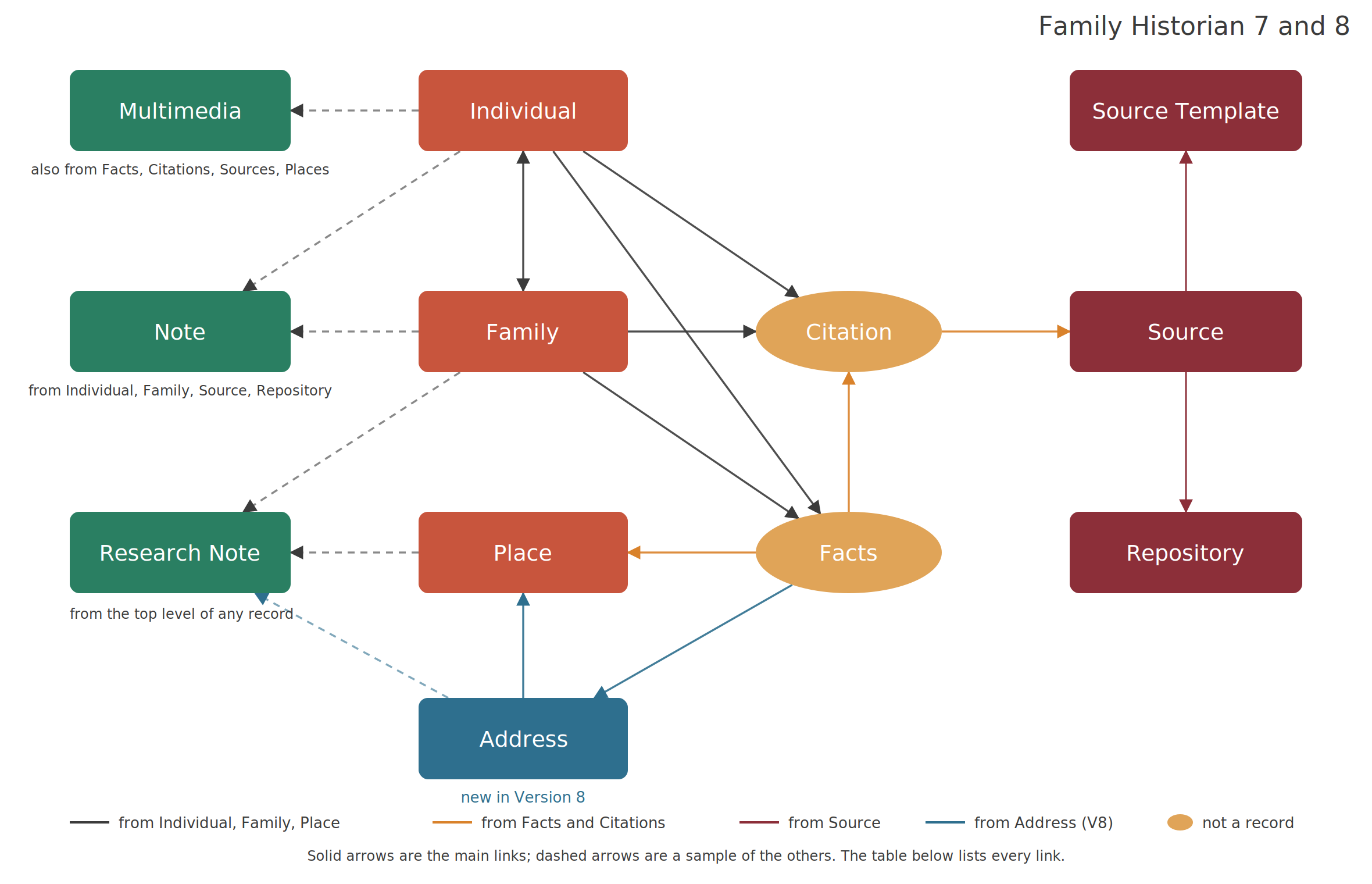
Facts are included on the diagram although they are not actually held as records in their own right. CitationsA link between a source and a fact, documenting Where within the source you find information being "cited" to support the fact/conclusion. are also not records in their own right, but are used to connect many of the other records to Sources, so are included to make the relationships clearer.
The diagram shows the main links and a sample of the rest. The table lists every link each record type can hold. A link is made from the record in the first column to the records in the second; the third column has anything that changed in Version 8.
| From | Links to | Version 8 |
|---|---|---|
| Individual | Family (as spouse or parent, and as child); its own Facts; Citations; Multimedia; Note; Research Note | Non-family relationships between Individuals (friends, groups, custom relationships) |
| Family | Individual (husband, wife, children); its own Facts; Citations; Multimedia; Note; Research Note | |
| Facts (held inside Individual and Family records) | Citations; Place (by name); Multimedia; Individual (as a witnessA Witness is somebody who played an important role in an event (or rarely, attribute) but were not a Principal, e.g. they could have been a bridesmaid at a wedding, rather than one of the individuals getting married.) | Address |
| Citation (held inside records and facts) | Source; Multimedia | |
| Source | Repository; Source Template (templated sourcesFamily Historian Version 7 introduced the ability to define sources using 'Source Templates' to aid precision and consistency in entering source-identifying information. , Version 7 on); Multimedia; Note; Research Note | Free-form sources: a third kind of source alongside generic and templated |
| Repository | Note; Research Note | |
| Source Template | Nothing; it is linked to from Source records | |
| Multimedia | Citations; Research Note | |
| Note | Citations; Research Note | |
| Place | Multimedia; Research Note | Address records link to a Place |
| Address | — | New record type: Place; Multimedia; Research Note |
| Research Note | Any record, as an embedded link in the note text |
Note records and Research Notes differ in what can point at them. Note records can be linked from Individual, Family, Source and Repository records but not from Places, Addresses, facts or citations, which have local notes instead. Research Notes can be linked from the top level of any record, Places and Addresses included.
Note Records are linked to other records where local Note fields are allowed.
Place Records were introduced in ƒh V6, and are linked to each Place field by Name rather than Record IdEvery record in Family Historian has a numeric Record ID, which uniquely identifies it within its type of record..
Research Note Records were introduced in ƒh V7 to hold family history research details, and are linked to the top level of other records.
Source Template Records were introduced in ƒh V7 to hold formatting details for templated Source records.
Address Records were introduced in ƒh V8. An address that used to be free text on an eventEvents are things that happened to an Individual and Attributes are things that described them. is now a record in its own right, linked to a Place Record, and can be geocoded and mapped like a place.
In addition there are Header Record, Submitter Record and Submission Record types.
The last two pages of the GEDCOM Standard Release 5.5 specification has a GEDCOM 5.5 DATA MODEL CHART that illustrates the full data structure, which is formally defined within the linear-linked grammar on the earlier pages. ƒh is based on that data model but with allowed customisations as defined by the GEDCOM Extension List and in ƒh V7 is modified for the GEDCOM Standard Release 5.5.1 specification.